• Skip to main content
  • Skip to secondary menu
  • Skip to primary sidebar

Old School Racing

iRacing Setups and Resources • Dirt & Asphalt Oval Racing News

  • Get iRacing Setups
  • iRacing Driving Tips
    • iRacing Rookie Tips
      • Tips for Surviving the iRacing Rookie Series
      • iRacing Dirt Career Paths for Rookies (and Beyond)
      • iRacing Rookie Guide Part 1
      • iRacing Rookie Guide Part 2
      • iRacing Rookie Tip: Stop The Car
      • iRacing Rookie Tips: Getting Started and Moving Up
      • iRacing Savvy – Develop Your Racecraft
      • Surviving The iRacing Rookie Series
    • Virgil Graham Slide Job Video
  • iRacing Quick Tips
  • iRacing Setup Help
    • How to Adjust iRacing Asphalt Legends Car Springs and Cross Weight
    • How to Adjust iRacing Sprint Car Cross Weight AKA Wedge
    • How to Make an iRacing Sprint Car Qualifying Setup
    • iRacing Advanced Legends Car Setup Matrix
    • iRacing Asphalt Late Model Stock Car Setup Matrix
    • iRacing Big Block Modified Setup Guide
    • iRacing Big Block Modified Setup Matrix
    • iRacing Dirt Late Model Setup Matrix
    • iRacing Dirt Sprint Car Setup Matrix
    • iRacing Dirt UMP Modified Setup Matrix
    • iRacing Dirt Car Specifications
    • iRacing Dirt Winged Sprint Car Setup Tutorial
    • iRacing Setup Guides
    • iRacing Setup Shop: Tire Stagger
    • iRacing Setup Stagger Chart
    • iRacing Setup Tips for Asphalt Oval Racing
    • NASCAR iRacing Class A Next Gen Cup Car Setup Matrix
    • Quick & Easy Guide: Making an iRacing Dirt 358 Modified Setup
  • iRacing Ton-o-Help
    • Hidden Feature in the iRacing Simulation: DriverRotateHead
    • Hidden Feature in the iRacing Simulation: DriverHeadHorizon
    • How to Automatically Set and Save the Correct Force Feedback For Each Car in iRacing
    • How to Change the Head Rotation Look Angle in iRacing
    • How to Disable Automatic Fast Repair, Tire Changes, and Fuel Fill in iRacing
    • How To Download and Open iRacing Setups
    • How to Improve Your Safety Rating Without the Risk of Racing Against Other Drivers
    • How to Install, Configure, and Use Discord
    • How to Properly Use Custom Car Numbers in iRacing
    • How To Run an iRacing Time Trial
    • iRacing Radio Information
    • Logitech G27 Calibration and Settings for Dirt Rally
    • Logitech G27 Calibration and Settings for iRacing
    • Logitech G29 and G920 Calibration and Settings for iRacing
    • Understanding the Dirt Late Model
  • FREE iRacing Setups

iRacing To Upgrade Asphalt Super Late Model in 2021 Season 2 Build

March 5, 2021 by Jeff Kendrick Leave a Comment

If you seek a broad array of iRacing setups at prices that actually make sense, you will find
them in our Discord. We keep the selection wide and the costs low, just as they ought to be
.

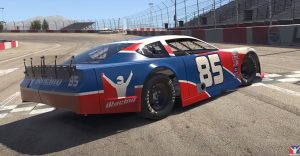
iRacing Updated Asphalt Super Late ModelIn the last few days we learned that iRacing will add the Bristol Dirt Track to its growing list of dirt tracks. Today it was announced that the Asphalt Super Late Model will be all new and upgraded.

The car’s updated bodywork will reflect the Next Generation cars that have been competing in the series. The updated car will be free to iRacing members who already own the current version of the Asphalt Super Late Model.

The Asphalt Super Late Model features a 358 cubic inch engine that renders more than 550 horsepower. The car only weighs 2800 pounds, features the weight distribution of a straight rail chassis, and has a fully adjustable rear suspension. It’s like a cross between an XFINITY car and a Tour Modified. The shape of the car’s body generates a tremendous amount of downforce, making the car capable of the highest cornering speeds of any stock car, including those cars used in NASCAR’s Cup Series.

Logitech G923 Racing Wheel and Pedals for Xbox X|S, Xbox One and PC Featuring TRUEFORCE up to 1000 Hz Force Feedback, Responsive Pedal, Dual Clutch Launch Control, and Genuine Leather Wheel Cover Serious sim racers want feedback they can trust, not some limp toy wheel pretending to be a steering column. The Logitech G923 Racing Wheel and Pedals delivers the real deal with TRUEFORCE force feedback, responsive pedals, and a hand-stitched leather wheel. Built for Xbox and PC, it brings sharper control and real driving feel to your rig so you can push harder every lap. If you want your sim racing to feel like the real thing, this wheel is ready to go to work.
List Price: $399.99 - SALE: $299.99

Filed Under: Racing News Tagged With: 2021 season 2 build, iracing super late model update

Reader Interactions

Leave a Reply Cancel reply

Your email address will not be published. Required fields are marked *

Primary Sidebar

iRacing Setups are Now
Available Here (OSR Discord)

FREE iRacing Setups are
Available Here (Limited)

Best Bang-For-Buck Entry-Level DD

Moza R5 BundleThe Moza R5 Bundle delivers the best value in entry-level direct drive — 5.5Nm of smooth power at a price that actually makes sense.

OSR Social Links

  • OSR Rumble Racing Videos
  • OSR Youtube Racing Videos
  • OSR Discord
  • OSR Facebook
  • OSR 𝕏

Search

OSR Rumble Racing Videos | OSR Discord | OSR Facebook
© 2026 · Old School Racing Motorsports · Privacy