One of the more difficult adjustments in the iRacing garage is the cross weight or wedge adjustment. If you’re new to these setups you may not know how to properly adjust the cross weight in the cars. This short tutorial will show you the correct way to adjust the cross weight or wedge in an iRacing Sprint Car.
What is cross weight?
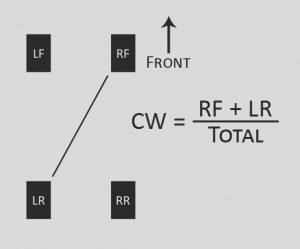
Cross weight is the static weight on the right front and left rear divided by the total static weight of the car, or RF + LR / TOTAL. See the diagram.

Logitech G920 Driving Force Racing Wheel & Pedals
This serves as a no-nonsense entry into realistic driving. Dual-motor force feedback delivers honest steering weight and road detail, while the sturdy floor pedals offer progressive braking and smooth throttle. Stainless steel paddle shifters, a leather-wrapped rim, and a full 900-degree rotation create a setup that earns its spot on your rig without needless extras. It works cleanly with Xbox Series X|S, Xbox One, and PC.
Buy on AmazonAffiliate link • Ships fast from Amazon
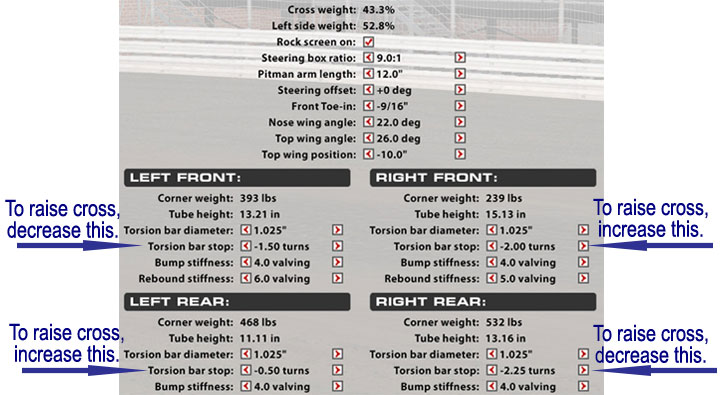
How to raise the cross weight in an iRacing Sprint Car.
To raise the cross weight, you can do one or all of the following:
- Decrease the turns in the left front torsion bar stop (removing weight from the left front).
- Increase the turns in the right front torsion bar stop (adding weight to the right front).
- Increase the turns in the left rear torsion bar stop (adding weight to the left rear).
- Decrease the turns in the right rear torsion bar stop (removing weight from the right rear).
Take a look at this image.
Logitech G920 Driving Force Racing Wheel & Pedals
This serves as a no-nonsense entry into realistic driving. Dual-motor force feedback delivers honest steering weight and road detail, while the sturdy floor pedals offer progressive braking and smooth throttle. Stainless steel paddle shifters, a leather-wrapped rim, and a full 900-degree rotation create a setup that earns its spot on your rig without needless extras. It works cleanly with Xbox Series X|S, Xbox One, and PC.
Buy on AmazonAffiliate link • Ships fast from Amazon
What does raising the cross weight do?
In an iRacing Sprint Car, raising the cross weight will typically loosen the car on entry and in the middle of the turn, and tighten the car a little on exit. Higher cross weights should be tried on drier tracks or any time the car feels too tight on entry. If the car feels loose on entry, lower the cross weight.
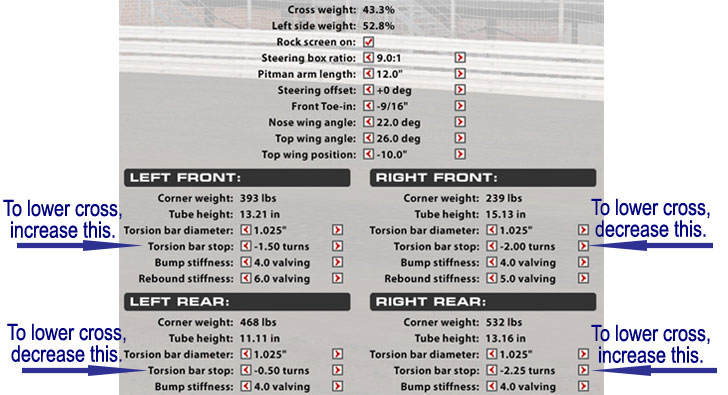
How to lower the cross weight in an iRacing Sprint Car.
To lower the cross weight, you can do one or all of the following:
- Increase the turns in the left front torsion bar stop (adding weight to the left front).
- Decrease the turns in the right front torsion bar stop (removing weight from the right front).
- Decrease the turns in the left rear torsion bar stop (removing weight from the left rear).
- Increase the turns in the right rear torsion bar stop (adding weight to the right rear).
Take a look at this image.
What does lowering the cross weight do?
Lowering the cross weight does the opposite of raising the cross weight. Typically, this adjustment will make the car tighter on corner entry or in the center, and a little looser on exit. You can lower the cross weight to help on tacky tracks. Sometimes it’s a good idea to lower the cross weight in a qualifying setup because the track is usually tackier in qualifying and you have less fuel weight in the rear of the car. If you race in a league in which qualifying is done on a drier track it may not be necessary to lower the cross weight for your qualifying setup and you may need to raise it for your qualifying and race setups.
How cross weight should be adjusted.
There is no hard rule about how you adjust the cross weight. I generally like to adjust all four corners or only lower the torsion bar stops on the two stops that are appropriate for my adjustment.
What else do I need to know about cross weight?
- If you decrease torsion bar stop turns you lower the tube height (ride height) on that corner of the car, and vice versa. That’s one reason I like to sometimes only decrease the appropriate torsion bar stops for my adjustment. It seems to be better in general to lower the car in most cases rather than raise it, but that’s not always true.
- If you change a torsion bar diameter you need to adjust the torsion bar stop on that corner to get your cross weight back to where it was before you changed the torsion bar diameter.
- If you change the tire stagger, you need to adjust the torsion bar stops to get your cross weight back to where it was before you changed the tire stagger.
- If you make any other adjustment that changes the cross weight, you need to adjust the torsion bar stops to return to your original cross weight.
- Start with the cross weight that iRacing gives you. It will usually work pretty well on moderate tracks. Raise the cross for tight entry, lower it for loose entry.
- This same procedure works on all iRacing oval cars as far as I know. The names may be different. Most cars use springs instead of torsion bars. Stock cars will usually have spring perch offsets instead of torsion bar stops. Street stocks use different types of springs and the adjustments have a different name, but it’s all the same. For asphalt, the cross weight adjustment results in some different but similar handling characteristics.
I hope this helps those who are lost when it comes to iRacing cross weight adjustments. If you have any questions contact me through the OSR Discord channel.
Awesome tutorial, thanks!
Thanks for this, it’s very clear an to the point!