If you’re reached this page, you’re most likely already an iRacing member with a whole lot of questions. If you’re willing to do a little reading, I’ll answer some of them. If you are already a member and you have your racing wheel, you might want to skip over to Part 2.
If you’re not a member yet but you are considering taking the plunge, this might help you, too. I guess the first question is: Is iRacing right for you? The one thing that determines that more than anything is your budget. iRacing isn’t terribly expensive, but you can’t go plop down fifty bucks and own the game to play whenever you want. In addition to that, you’re going to need decent equipment to play.
Other than budget, you will need to be willing to listen, read, and learn. Sometimes you just have to accept the fact that you are wrong. You will also have to realize that no matter how good you are, there is always someone better. You won’t win every race. In order to be successful in iRacing, you’ll also need to be friendly and polite. It’s not a good place to go try to troll others. I personally know of one instance in which an individual was very rude on the forums and drove like an idiot in the sessions. He was removed and banned from the service within 24 hours. It doesn’t pay to make enemies on iRacing.

Next Level Racing Wheel Stand 2.0
Master your laps without dominating the room. The Next Level Racing Wheel Stand 2.0 stands rock-solid for direct-drive wheels, yet folds away in seconds when real life calls. Full adjustability for wheel, pedals, and shifter lets a man settle into his proper position the honest way. A clever chair cradle keeps your seat planted under hard braking, while predrilled mounts welcome Thrustmaster, Fanatec, Logitech, and the rest. Upgrade later to a full cockpit with the GTSeat add-on. Serious performance, sensible footprint—no compromises required.
Buy on AmazonAffiliate link • Ships fast from Amazon
iRacing Community
That brings me to the topic of the iRacing community. First of all, it’s a community full of sim racers. Help and advice is fairly easy to find in the forums. Sometimes you can find setups there, but that becomes more and more rare. Dirt track and asphalt short track setups are best found here.
iRacing forum moderation is hit and miss. Sometimes I see things that should warrant a slap on the wrist or temporary loss of forum privileges, but nothing happens. You have the fan boys who will defend the indefensible beyond reason. You also have certain trolls who will try to get you to take the bait so they can try to get you banned. They use the iRacing forum moderators as a tool for their bullying.
If you go on the iRacing forums complaining about the safety rating system or about the idiots who wreck you all the time, you can expect to get flamed. Everyone who has been on iRacing for very long has read all that before, many, many times, and they don’t really want to read it again.
iRacing Requirements
I’m not going to list the typical “iRacing system requirements” in this section because they change fairly frequently. If that’s what you’re looking for, you can find those here. Essentially what you need is a current generation computer running Windows, a decent amount of memory, a decent graphics card, and, preferably a relatively recent racing wheel with force feedback. Yes, you can play with an Xbox controller if you like, but I don’t recommend it. If you want to be successful with iRacing, you need a decent wheel. Here are some force feedback wheels that are commonly used by iRacers:
Under $200
Under $300
- Logitech G27 (shouldn’t be much more than $200 used)
- Logitech G29 (prices sometimes fluctuate just over $300)

Logitech G923 Racing Wheel & Pedals
One of the most popular entry-to-mid level sim racing wheels available today. The G923 delivers strong TRUEFORCE feedback up to 1000 Hz that lets you feel the road with refreshing clarity, a responsive brake pedal with progressive spring, and a solid set of pedals built for consistent control. It includes a programmable dual-clutch launch system for cleaner starts, a genuine leather-wrapped wheel, and straightforward compatibility with PC, Xbox Series X|S, and Xbox One.
Buy on AmazonAffiliate link • Ships fast from Amazon
$300 Plus
- Logitech G920 (This is essentially the same wheel as the G29 but also works with Xbox One).
- Thrustmaster T300RS
$400 Plus
Over $500
I think the most popular wheel on iRacing is still the Logitech G27. You can still find them used on ebay. They’re built solid so used is okay. If you decided to go that route, make sure you get the wheel with base, the pedals, the H-pattern shifter, and the power supply. It shouldn’t cost much more than $200.
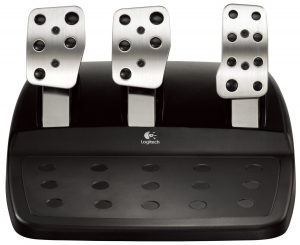
My recommendation? Get the Logitech G29. Why? The pedals. Thrustmaster’s force feedback is a little better, but their pedals are pretty bad and there isn’t a lot you can do to them. Logitech has a very good set of pedals. You can also modify them with things like a stiffer brake spring and a Bodnar cable which adds resolution to your pedals. (I’m not going to get into a discussion about pedal resolution, but my opinion is that the Bodnar cable is a waste of money.) You can also move your Logitech pedals. If you want the brake all the way on the left side instead of in the middle, you can do that quite easily. If you can find a good Logitech G27 for under $200, that is just about as good as the G29 and it has the exact same pedals. The G27 should come with a working power supply and H-pattern shifter, and of course the wheel and pedals.
Read part 2 of the OSR iRacing Rookie Guide