Note: This article was written before the advent of iRacing dirt. The information contained in the article pertains primarily to real world tire stagger physics. Most of the information is relevant in iRacing asphalt simulations. iRacing dirt physics are still a long way off so the information here usually won’t work in most dirt cars. The exceptions (as of May, 2018) are generally in the UMP Modified and Dirt Street Stock Cars where proper tire stagger setting seem to work pretty well on most tracks.
What is tire stagger?
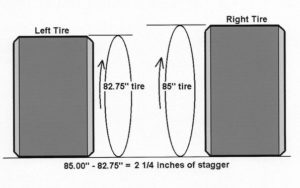
Tire stagger is the difference in circumference between the left side and right side tires. There is front stagger, which compares the right front to the left front, and rear stagger, which compares the right rear to the left rear. On an oval track, a larger right side tire allows the left and right sides to make the same number of rotations through the corner.

Logitech G920 Driving Force Racing Wheel & Pedals
This serves as a no-nonsense entry into realistic driving. Dual-motor force feedback delivers honest steering weight and road detail, while the sturdy floor pedals offer progressive braking and smooth throttle. Stainless steel paddle shifters, a leather-wrapped rim, and a full 900-degree rotation create a setup that earns its spot on your rig without needless extras. It works cleanly with Xbox Series X|S, Xbox One, and PC.
Buy on AmazonAffiliate link • Ships fast from Amazon
How does stagger affect the handling of the car?
If you don’t have enough rear stagger, the front of the car will hit the wall exiting the turn (the car will push, be tight, or understeer). If you have too much rear stagger, the back of the car will hit the wall exiting the turn (the car will be loose, or oversteer). If you don’t have enough stagger on the front tires, the car will push on corner entry. Too much front stagger will cause the car to be loose under heavier braking on corner entry.
One common mistake I’ve seen is to immediately start making stagger changes if the car is loose or tight. The best thing to do is find the right stagger, set it there, and leave it alone.
One of the most important things any tire or setup guru in racing will tell you is to match tire stagger to the race track. If you don’t get the tire stagger set right, it ruins the handling of the car. Using more or less tire stagger is a mistake. If it helps the handling of the car it’s a crutch, and the problem is elsewhere in your setup.
How do I find the right stagger?
Correct tire stagger settings are determined mathematically using a given set of values. Specifically, you need the following data:
- The distance the inside tire travels through the turn.
- The distance the outside tire travels through the turn.
- The front and rear track widths of the car. If you look on the iRacing car pages, this information is provided for most cars.
- The radius of the track’s turns. If the turns are different, use the radius of the tightest turn. Turn radius should be measured in the path of the left side tires.
- The circumference of the left side tire.
- The track’s banking in degrees.
- Pi. No, it’s not snack time. Pi as in the ratio of a circle’s circumference to its diameter – 3.14159265359.
Fortunately, Matt Holden has provided an Excel spreadsheet that can be used to calculate tire stagger. The spreadsheet provides the turn radii and banking for different tracks and the left side tire circumferences and track widths for different cars. All you have to do is input the data and the spreadsheet outputs the stagger for you. I took that one step further and created an iRacing Setup Stagger Chart that you can use to quickly find the stagger for any short track/short track car combination.
For cars with the same track width on both the front and rear, use the same stagger on both the front and the rear. If the track widths are different, calculate the stagger for the front and the rear tires separately.
Logitech G920 Driving Force Racing Wheel & Pedals
This serves as a no-nonsense entry into realistic driving. Dual-motor force feedback delivers honest steering weight and road detail, while the sturdy floor pedals offer progressive braking and smooth throttle. Stainless steel paddle shifters, a leather-wrapped rim, and a full 900-degree rotation create a setup that earns its spot on your rig without needless extras. It works cleanly with Xbox Series X|S, Xbox One, and PC.
Buy on AmazonAffiliate link • Ships fast from Amazon
Another consideration is tire growth. As a general rule, the right side tires will grow more than the left side tires. This is much more prevalent on the front tires. The reason for this is, the left front tire doesn’t build nearly as much heat as the right front tire under normal circumstances. The rear tires will tend to maintain stagger values closer to the initial setting.
iRacing stagger is not the same as real world stagger.
Why is iRacing stagger different from real world stagger? Because the engineer who designed iRacing’s physics engine built in an automatic compensation for tire pressure. I’m speaking of Eric Hudec. Eric has this to say about tire staggers in iRacing:
The stagger in iRacing works like this:
We know how much a specific tire will grow with inflation pressure, and it’s built into the model. We allow iRacing members to set whatever stagger they like independent of that. In the background we then add or subtract the difference within the model. So if you’ve got 15 psi on a LS tire an 25 psi on a RS tire the roll-out difference internally might be 1.75″. If that’s the case and the user specifies 2.0″ of stagger within the setup we will automatically subtract 0.125″ of roll-out from the LS tire and add 0.125″ of roll-out to the RS tire internally. You should be able to see this as it’ll affect the ride heights to some degree. For typical cases of inflation pressure this procedure makes perfect reasonable sense; in reality that’s what you do to set stagger, as it is the combination of inflation induced tire growth and slight differences in construction from one tire to the next. However, once you start bringing the LS and RS pressures closer together it then becomes unreasonable to achieve large staggers, although we still do make it available.

In a nutshell, the tire pressure you set in the Garage in the iRacing simulator has no effect on the tire stagger. If you set your tire stagger to 2 inches, the stagger is 2 inches regardless of the tire pressure setting. As Eric points out, this makes sense, since air pressure is one of the components used to create tire stagger.
What about tire growth during a race in iRacing?
Eric Hudec goes on to say this about tire growth during a race:
Yes the stagger will change over a run. As the tires grow the stagger in most cases will increase.
So, when it comes to tire stagger in iRacing, tire pressure can be ignored, but be aware that stagger will usually increase over a run. If your car handles well during the first few laps of a run but then starts to feel loose after 10-20 laps, you could have a tire growth issue. You should not assume that the tire stagger needs to be lowered. The tires may be overheating and growing too much due to something else in the setup. The most likely culprit is the right side tire pressure itself. If everything else seems okay in your setup, try lowering the right side tire pressure a little to mitigate the growth induced by higher tire temperatures. Sometimes lowering the pressure by one pound in the right front and right rear tires can make all the difference with a tire growth issue.
It’s also worth noting that radial tires will not grow. I know that the Legends cars use radial tires. Street Stocks use bias-ply tires. It’s unclear what type of tires are used on Late Models, Super Late Models, and the two Modified cars. It’s a good guess that these cars use bias-ply tires since they are less expensive; however, I am aware that some Super Late Model tours use radial tires. The top NASCAR divisions began using radial tires several years ago. If radial tires grow any at all, it’s a negligible amount. This applies to radial racing tires in the real world. I have not had the opportunity to test radial tires in iRacing.
At what point in the setup building process should I set the tire stagger?
In general, the tire stagger should be the first thing you set because it’s a known value. You might want to start out with the tire stagger a click or two lower than the calculated value. Once you get the car to handle pretty well, you can adjust it a little. You will find that the tire stagger is wrong in almost every setup whether it’s an iRacing baseline setup or a downloaded setup.
When I’m starting from scratch, I usually start with the iRacing baseline setup for the track, then I set the tire stagger to the correct value. This sometimes necessitates a ride height adjustment. Then I test the car to see how it feels. Since most of the setups use far too little tire stagger, you will usually see a giant right rear spring in the car. Most of the time you will end up softening that spring. Once I get the car to to a point where it is reasonably drivable, I set the cambers. More on that in another article.
If you have any questions you can leave a comment, contact me here through OSR Mail, or on the OSR Discord Voice/Text Chat server.
Great information! Thanks to your stagger chart and help from Matt Holden I’ve definitely built better setups this season.
where can i find that calculator?