• Skip to main content
  • Skip to secondary menu
  • Skip to primary sidebar

Old School Racing

iRacing Setups and Resources • Dirt & Asphalt Oval Racing News

  • Get iRacing Setups
  • iRacing Driving Tips
    • iRacing Rookie Tips
      • Tips for Surviving the iRacing Rookie Series
      • iRacing Dirt Career Paths for Rookies (and Beyond)
      • iRacing Rookie Guide Part 1
      • iRacing Rookie Guide Part 2
      • iRacing Rookie Tip: Stop The Car
      • iRacing Rookie Tips: Getting Started and Moving Up
      • iRacing Savvy – Develop Your Racecraft
      • Surviving The iRacing Rookie Series
    • Virgil Graham Slide Job Video
  • iRacing Quick Tips
  • iRacing Setup Help
    • How to Adjust iRacing Asphalt Legends Car Springs and Cross Weight
    • How to Adjust iRacing Sprint Car Cross Weight AKA Wedge
    • How to Make an iRacing Sprint Car Qualifying Setup
    • iRacing Advanced Legends Car Setup Matrix
    • iRacing Asphalt Late Model Stock Car Setup Matrix
    • iRacing Big Block Modified Setup Guide
    • iRacing Big Block Modified Setup Matrix
    • iRacing Dirt Late Model Setup Matrix
    • iRacing Dirt Sprint Car Setup Matrix
    • iRacing Dirt UMP Modified Setup Matrix
    • iRacing Dirt Car Specifications
    • iRacing Dirt Winged Sprint Car Setup Tutorial
    • iRacing Setup Guides
    • iRacing Setup Shop: Tire Stagger
    • iRacing Setup Stagger Chart
    • iRacing Setup Tips for Asphalt Oval Racing
    • NASCAR iRacing Class A Next Gen Cup Car Setup Matrix
    • Quick & Easy Guide: Making an iRacing Dirt 358 Modified Setup
  • iRacing Ton-o-Help
    • Hidden Feature in the iRacing Simulation: DriverRotateHead
    • Hidden Feature in the iRacing Simulation: DriverHeadHorizon
    • How to Automatically Set and Save the Correct Force Feedback For Each Car in iRacing
    • How to Change the Head Rotation Look Angle in iRacing
    • How to Disable Automatic Fast Repair, Tire Changes, and Fuel Fill in iRacing
    • How To Download and Open iRacing Setups
    • How to Improve Your Safety Rating Without the Risk of Racing Against Other Drivers
    • How to Install, Configure, and Use Discord
    • How to Properly Use Custom Car Numbers in iRacing
    • How To Run an iRacing Time Trial
    • iRacing Radio Information
    • Logitech G27 Calibration and Settings for Dirt Rally
    • Logitech G27 Calibration and Settings for iRacing
    • Logitech G29 and G920 Calibration and Settings for iRacing
    • Understanding the Dirt Late Model
  • FREE iRacing Setups

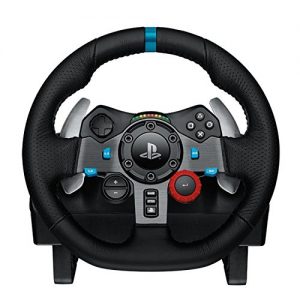
Logitech Driving Force G29 Racing Wheel


Logitech G29 Racing Wheel

The Logitech G29 (or G920) is the racing wheel that I would recommend over any other at this time, unless you want to spend at least 4 times this amount on a Fanatec product. Until recently, I was still using an old Logitech G27 and I loved it, although I did upgrade the brake with a Ricmotech load cell. I upgraded to the Logitech G29 wheel. I still use my old pedals with the load cell modification and a Leo Bodnar Cable. The Logitech wheels are relatively inexpensive yet they are incredibly stable, precise, and durable.

Thrustmaster T300RS GT Steering Wheel & Pedal Set

Thrustmaster T300RS GT Steering Wheel & Pedal Set

The T300 is a proven mid-range wheel with smooth belt-driven force feedback and a responsive brushless motor for clear track feel. An 11-inch leather wheel, solid three-pedal GT set, and PS5, PS4, and PC compatibility give racers the precision to brake later, hold tighter lines, and improve lap after lap.

Buy on Amazon

Affiliate link • Ships fast from Amazon

The Amazon listing says this is for the PlayStation 3 and PlayStation 4, but it’s also for the PC. Likewise, the listing says “Wheel Only” but this set includes the wheel and pedals. It does not include the H-pattern shifter which you can get separately. If you do want the shifter, you can save a couple of bucks and buy the wheel and shifter bundle here.

If you seek a broad array of iRacing setups at prices that actually make sense, you will find
them in our Discord. We keep the selection wide and the costs low, just as they ought to be
.

Some people believe that the G29 is a glorified G27 with some new buttons and no shifter. That is not true at all. Logitech made a big improvement in the linearity of the force feedback on the G29 and G920 wheels. The G27 does not respond well to low force requests from the game you are playing. If you have a G27 and are considering a G29 or G920, the benefits you are going to get are:

  1. More buttons on the wheel.
  2. More linear force feedback.
  3. The G29 and G920 are more stable and smoother than the G27.
  4. PlayStation/Xbox One compatibility.

If you have a Logitech G27 racing wheel, I would say that it is worth the upgrade to the Logitich G29 or G920.

One thing that I do like about the G27 is the placement of the buttons. They are easier to reach with your thumbs than the buttons on any other wheel I have seen including the newer Logitech products. If you would like to save a few bucks, you can still buy a used Logitech G27 Racing Wheel.

Primary Sidebar

iRacing Setups are Now
Available Here (OSR Discord)

FREE iRacing Setups are
Available Here (Limited)

Best Bang-For-Buck Entry-Level DD

Moza R5 BundleThe Moza R5 Bundle delivers the best value in entry-level direct drive — 5.5Nm of smooth power at a price that actually makes sense.

OSR Social Links

  • OSR Rumble Racing Videos
  • OSR Youtube Racing Videos
  • OSR Discord
  • OSR Facebook
  • OSR 𝕏

Search

OSR Rumble Racing Videos | OSR Discord | OSR Facebook
© 2026 · Old School Racing Motorsports · Privacy