• Skip to main content
  • Skip to secondary menu
  • Skip to primary sidebar

Old School Racing

iRacing Setups and Resources • Dirt & Asphalt Oval Racing News

  • Get iRacing Setups
  • iRacing Driving Tips
    • iRacing Rookie Tips
      • Tips for Surviving the iRacing Rookie Series
      • iRacing Dirt Career Paths for Rookies (and Beyond)
      • iRacing Rookie Guide Part 1
      • iRacing Rookie Guide Part 2
      • iRacing Rookie Tip: Stop The Car
      • iRacing Rookie Tips: Getting Started and Moving Up
      • iRacing Savvy – Develop Your Racecraft
      • Surviving The iRacing Rookie Series
    • Virgil Graham Slide Job Video
  • iRacing Quick Tips
  • iRacing Setup Help
    • How to Adjust iRacing Asphalt Legends Car Springs and Cross Weight
    • How to Adjust iRacing Sprint Car Cross Weight AKA Wedge
    • How to Make an iRacing Sprint Car Qualifying Setup
    • iRacing Advanced Legends Car Setup Matrix
    • iRacing Asphalt Late Model Stock Car Setup Matrix
    • iRacing Big Block Modified Setup Guide
    • iRacing Big Block Modified Setup Matrix
    • iRacing Dirt Late Model Setup Matrix
    • iRacing Dirt Sprint Car Setup Matrix
    • iRacing Dirt UMP Modified Setup Matrix
    • iRacing Dirt Car Specifications
    • iRacing Dirt Winged Sprint Car Setup Tutorial
    • iRacing Setup Guides
    • iRacing Setup Shop: Tire Stagger
    • iRacing Setup Stagger Chart
    • iRacing Setup Tips for Asphalt Oval Racing
    • NASCAR iRacing Class A Next Gen Cup Car Setup Matrix
    • Quick & Easy Guide: Making an iRacing Dirt 358 Modified Setup
  • iRacing Ton-o-Help
    • Hidden Feature in the iRacing Simulation: DriverRotateHead
    • Hidden Feature in the iRacing Simulation: DriverHeadHorizon
    • How to Automatically Set and Save the Correct Force Feedback For Each Car in iRacing
    • How to Change the Head Rotation Look Angle in iRacing
    • How to Disable Automatic Fast Repair, Tire Changes, and Fuel Fill in iRacing
    • How To Download and Open iRacing Setups
    • How to Improve Your Safety Rating Without the Risk of Racing Against Other Drivers
    • How to Install, Configure, and Use Discord
    • How to Properly Use Custom Car Numbers in iRacing
    • How To Run an iRacing Time Trial
    • iRacing Radio Information
    • Logitech G27 Calibration and Settings for Dirt Rally
    • Logitech G27 Calibration and Settings for iRacing
    • Logitech G29 and G920 Calibration and Settings for iRacing
    • Understanding the Dirt Late Model
  • FREE iRacing Setups

Lucas Oil Raceway

If you seek a broad array of iRacing setups at prices that actually make sense, you will find
them in our Discord. We keep the selection wide and the costs low, just as they ought to be
.

Lucas Oil Raceway on iRacing

Lucas Oil Raceway Track Information

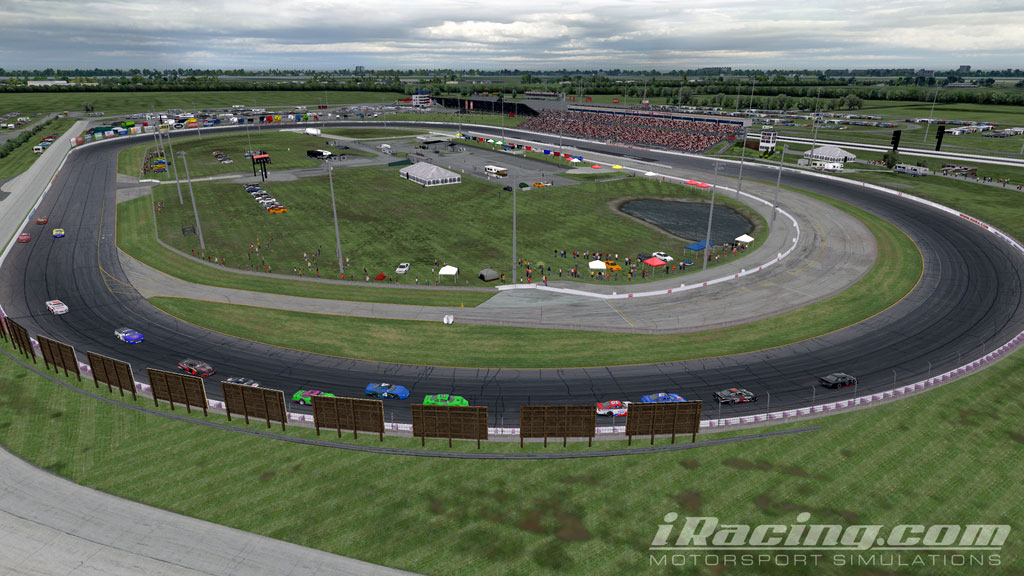
Lucas Oil Raceway is a .686 (just a skosh more than two thirds) mile oval located in Brownsburg, Indiana. It has a traditional symmetrical oval shape. The banking is moderate at 12° although it feels pretty flat when you’re driving on it. The racing surface is three full lanes wide with a low lane that is typically not used for racing and an apron below that. The preferred racing line is generally high, near the wall, but many drivers will use the middle of the track on entry and exit.

How to Drive Lucas Oil Raceway

Although the track is very wide, passing can be difficult because the actual racing line is not that wide. One good place to pass is at the exit of turn four. If you can get a good run through turns three and four, you can sometimes dip low around the middle-low part of the track and make a clean pass. Unfortunately, some drivers have no respect for your line and will also dip low. That usually results in the car on the outside spinning out, blaming the driver on the inside even though the driver on the outside was the one who dipped low and did not allow the driver on the inside enough room to race. It’s part of the deal at Lucas Oil Raceway. Sometimes you can also pass by running a low line in the corners. It’s very difficult to pull off and requires a lot of patience. You almost have to pull a dirt-racing-style slide job to do it, although you’re simply drifting up on exit more than you are sliding. When you drift up in front of the car on the outside, it forces the other driver to lift briefly because he will have more momentum than you have.

Logitech G923 Racing Wheel and Pedals for Xbox X|S, Xbox One and PC Featuring TRUEFORCE up to 1000 Hz Force Feedback, Responsive Pedal, Dual Clutch Launch Control, and Genuine Leather Wheel Cover Serious sim racers want feedback they can trust, not some limp toy wheel pretending to be a steering column. The Logitech G923 Racing Wheel and Pedals delivers the real deal with TRUEFORCE force feedback, responsive pedals, and a hand-stitched leather wheel. Built for Xbox and PC, it brings sharper control and real driving feel to your rig so you can push harder every lap. If you want your sim racing to feel like the real thing, this wheel is ready to go to work.
List Price: $399.99 - SALE: $299.99

If you’re not familiar with how to diamond a corner, you will need to learn how to do that at Lucas Oil Raceway. This is also known as a double apex. We often hear and say “turn 1, turn 2, turn 3, turn 4” on ovals. What you really have is more like turn 1 entry, turn 1 exit, turn 2 entry, turn 2 exit. It can be confusing for those new to oval racing to hear “turn 3” or “turn 4.” On short ovals in particular, there really are only two turns. That’s not really the case so much with Lucas Oil Raceway. The turns are so long that it’s best to drive them as four distinct corners. That’s where “diamonding” aka the double apex comes in.
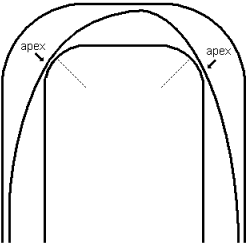
Double Apex or Diamond a Corner
The Double Apex

There on the left you see a very simple diagram I made with my Crayolas. The turns are exaggerated (the track actually looks a little bit like Indianapolis Motor Speedway with that short chute, or tiny straightaway between the corners) to better illustrate the concept of diamonding a corner. You can see now why it’s called a double apex. You apex on entry and on exit. When you make one complete lap, your live takes the shape of a diamond (sort of), hence the technique also became known as diamonding the corner. As the diagram shows, you turn in, drift up, turn down, then drift up again.

For Lucas Oil Raceway, my line goes something like this. I ease into the corners with light trail braking and my left side tires on the dashed line. Sometimes you can brake a little harder but only do it when you really need it, otherwise you are going to wear out your tires. When I hit the corner right, the car drifts up in the center and will usually get pretty close to the outside wall. As I exit the corner, the car will naturally turn lower (on a properly driven decent setup) and I usually end up with my left side tires somewhere around that solid line in the middle of the track. Everyone’s line will vary some, but that’s a good indication of where your car should be positioned on the track.

Typically, you’re probably going to exit the corner a little lower than you enter. The idea is to get the car pointed as straight as you can, get back on the throttle sooner/harder and drift to the outside wall on exit. You want a good clean, fast exit for that straightaway. With practice, you’ll be turning great laps on the track. Check the OSR Setup Repository for plenty of great setups for this track.

Primary Sidebar

iRacing Setups are Now
Available Here (OSR Discord)

FREE iRacing Setups are
Available Here (Limited)

Best Bang-For-Buck Entry-Level DD

Moza R5 BundleThe Moza R5 Bundle delivers the best value in entry-level direct drive — 5.5Nm of smooth power at a price that actually makes sense.

OSR Social Links

  • OSR Rumble Racing Videos
  • OSR Youtube Racing Videos
  • OSR Discord
  • OSR Facebook
  • OSR 𝕏

Search

OSR Rumble Racing Videos | OSR Discord | OSR Facebook
© 2026 · Old School Racing Motorsports · Privacy