After four years on iRacing, I have a fairly good understanding of iRacing’s version of most of the short track asphalt cars. When dirt was released, I made the move because I love dirt racing. I quickly found out that setting up an asphalt car isn’t anything like setting up a dirt car. Some things are similar, and some things are actually 180° out of phase.
With this post I’ll try to convey some of the things I have learned about the Dirt Late Model cars. I still don’t understand some of it, and some of it may be wrong, but it’s what I’ve managed to pick up here and there about a few of the adjustments and what they do to the cars. So let’s get started.
J-Bar
 Serious sim racers want feedback they can trust, not some limp toy wheel pretending to be a steering column. The Logitech G923 Racing Wheel and Pedals delivers the real deal with TRUEFORCE force feedback, responsive pedals, and a hand-stitched leather wheel. Built for Xbox and PC, it brings sharper control and real driving feel to your rig so you can push harder every lap. If you want your sim racing to feel like the real thing, this wheel is ready to go to work.
List Price:
One of the purposes of the J-Bar is to hold the rear axle in place laterally, or to keep the rear axle from moving from side to side. This is probably the hardest thing for me to understand on these cars. The video below is really good, but I still don’t quite comprehend how the J-Bar, sometimes called the Panhard Bar, actually works with respect to the handling of the car.
You can see the J-Bar in the video a little better at full screen. It’s the black J-shaped bar under the yellow coil spring.
This video shows how the car gets “up on the bar” under acceleration. It doesn’t take full throttle to get the car up on the bar, but it does vary by the amount of throttle applied. Notice that the car drops off the bar very briefly on entry when the driver lifts. You really want to keep the car up on the bar as much as possible. That means you need to stay in the throttle, at least partially, just about all the time. I usually find it’s okay to lift briefly on entry as is shown in the video.
The J-Bar raises the left rear of the car under acceleration. That shifts dynamic weight to the right rear. If you lower the J-Bar on the axle only, adding more angle, the car will get “up on the bar” more quickly. The end result is that you shift the weight to the right rear sooner.
Further:
- Lower J-Bar (both ends) = more chassis roll = tighter
- Higher J-Bar (both ends) = less chassis roll = looser
- More J-Bar angle (lower on the axle and/or higher on the chassis) pushes the left rear harder into the track surface and reduces the sliding action of the rear tires. This is commonly referred to as J-Bar rake. In theory at least, increasing the angle, or J-Bar rake, should tighten the car any time it’s up on the bars. Too much angle can stop the chassis from rolling.
Ballast Forward
Ballast is usually made up of lead blocks or some sort of moveable lead. I think iRacing uses the term Ballast Forward because it’s measured by how far forward the ballast is from the center of the chassis. Moving the ballast forward or back changes the balance of the car and how it reacts in cornering.
If the front end of the car feels light and your steering inputs don’t seem to be working right, you might need to move more ballast to the front of the car. A lot of people have an issue where the car wants to turn right when exiting the corner or at some point when it should be going pretty much straight. I think some of that may be caused by having too much ballast in the back of the car. This condition can be corrected with practice most of the time, but if it’s too severe you may need to move some ballast forward.
In general, more Ballast Forward is going to make the car tighter on entry and possibly a little looser on exit. Decreasing Ballast Forward (moving weight to the rear of the car) will generally make the car looser on entry and maybe a little tighter on exit.
Axle Lead
This one seems a little complex at first, but, as it turns out, it’s actually pretty simple.
- Positive axle lead moves the right rear wheel forward, shortening the right side wheelbase of the car. This will tighten the car throughout the corner.
- Negative axle lead moves the right rear wheel backward, lengthening the right side wheelbase of the car. This will loosen the car throughout the turn.
- Too much axle lead can negatively affect straight line stability.
If you put your mind to it, you can understand how and why this works. If you move the right rear wheel forward, you’re also turning both of the rear wheels slightly to the left, as though the left rear is toe’d out and the right rear is toe’d in. When you think about what is physically happening with the wheels set in that direction, you know that the car is going to want to turn right just a little bit, and probably more so under acceleration. It’s sometimes called rear steer because you’re actually doing a little bit of steering with the rear end of the car. A picture is worth a thousand words.
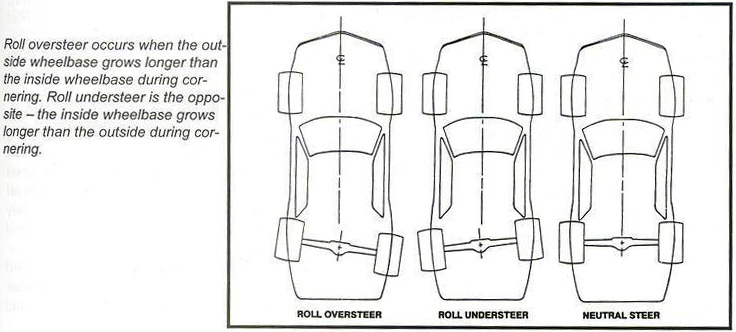
- Roll Oversteer = Negative Axle Lead
- Roll Understeer = Positive Axle Lead
- Neutral Steer = Zero Axle Lead
You should now see why axle lead can change the way the car turns.
Leave a Reply