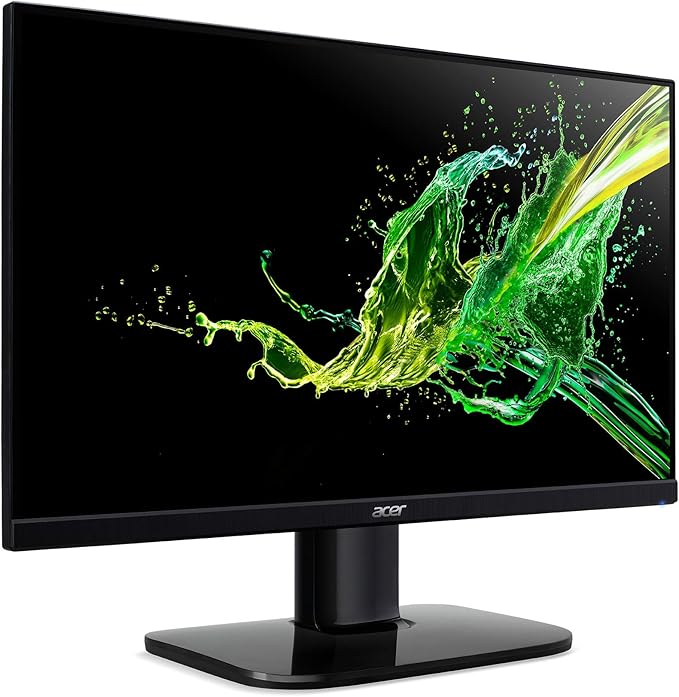
If you’re searching for a monitor that can effortlessly handle both gaming and office tasks without straining your budget, we’ve come across an option that could perfectly fit the bill. The Acer 27″ IPS monitor deal delivers exceptional picture quality, seamless performance, and an elegant design, all at a wallet-friendly price point.
As of this moment, the Acer KB272 EBI Monitor is currently available at a reduced price of $119.99 on Amazon. This markdown represents a 25% decrease from its initial cost of $159.99, allowing you to pocket a saving of $40 by seizing this opportunity.

Logitech G920 Driving Force Racing Wheel & Pedals
This serves as a no-nonsense entry into realistic driving. Dual-motor force feedback delivers honest steering weight and road detail, while the sturdy floor pedals offer progressive braking and smooth throttle. Stainless steel paddle shifters, a leather-wrapped rim, and a full 900-degree rotation create a setup that earns its spot on your rig without needless extras. It works cleanly with Xbox Series X|S, Xbox One, and PC.
Buy on AmazonAffiliate link • Ships fast from Amazon
This monitor is loaded with features that enhance its value proposition. Let’s delve deeper into what it brings to the table, whether you intend to utilize it for home office tasks or gaming endeavors.
Features
- 27-inch Immersive IPS Display: Boasting a Full HD resolution of 1920 x 1080, this expansive screen provides ample real estate for both gaming and productivity needs. The IPS panel ensures a vivid and crystal-clear visual experience from every viewing angle.
- Smooth 100Hz Refresh Rate: While not reaching the highest refresh rates available, this 100Hz refresh rate brings noticeable improvements in motion clarity and fluidity, particularly when compared to standard 60Hz monitors. For even more performance, you can overclock it to 120Hz using the convenient OSD (On-Screen Display) menu.
- Enhanced by AMD FreeSync Technology: The Acer KB272 EBI monitor is equipped with AMD FreeSync technology, enabling a dynamic refresh rate range of 48 Hz to 100 Hz. This adaptive range synchronizes with your graphics card’s frame rate, providing tear-free visuals suitable for a wide range of games and applications.
- 1ms VRB for Sharp Visuals: Combatting ghosting and smearing in fast-paced scenes, the 1ms VRB (Visual Response Boost) technology minimizes motion blur caused by the monitor’s pixel response time. The result is a noticeably crisper image, enhancing your overall viewing experience.
- Eye-Friendly Low Blue Light Mode: The Acer KB272 integrates a Low Blue Light mode, which curtails the emission of blue light known to induce eye strain and fatigue during extended use. This feature can be accessed conveniently through the OSD menu or a dedicated button on the monitor itself.
- Ergonomic Tilt for Personalized Comfort: Offering a tilt adjustment range of -5° to 15°, this ergonomic feature enables you to tailor the monitor’s angle to your individual preferences and posture, promoting a more comfortable viewing experience. Additionally, the monitor adheres to VESA mount standards of 75x75mm, allowing for wall mounting or attachment to a monitor arm to optimize your workspace.
Logitech G920 Driving Force Racing Wheel & Pedals
This serves as a no-nonsense entry into realistic driving. Dual-motor force feedback delivers honest steering weight and road detail, while the sturdy floor pedals offer progressive braking and smooth throttle. Stainless steel paddle shifters, a leather-wrapped rim, and a full 900-degree rotation create a setup that earns its spot on your rig without needless extras. It works cleanly with Xbox Series X|S, Xbox One, and PC.
Buy on AmazonAffiliate link • Ships fast from Amazon
Acer KB272 EBI Monitor Specifications
- Brand: Acer
- Model Name: KB272 EBI
- Screen Size: 27 Inches
- Display Resolution: 1920 x 1080
- Refresh Rate: 100 Hz
- Response Time: 1ms VRB
- Brightness: 250 nits
- Pixel Pitch: 0.311mm
- Variable Refresh Rate (VRR): AMD FreeSync Technology, Flicker Free
- Ergonomic Tilt: -5° to 15°
- VESA Mounting: Compliant (100 x 100mm)
- Ports: 1 x HDMI 1.4 Port & 1 x VGA Port (HDMI Cable Included)
The Acer KB272 EBI stands out as an excellent budget monitor, catering to gamers and professionals seeking a seamless and captivating viewing encounter. With key features like its 100Hz refresh rate, AMD FreeSync technology, and swift 1ms VRB response time, it ensures a fluid and responsive gaming experience devoid of screen tearing or stuttering. The inclusion of an IPS panel translates to expansive viewing angles, accurate color reproduction, and commendable contrast – attributes that render it versatile across diverse tasks and content types.
Priced at just $119.99, this monitor provides an exceptional combination of value for money and performance, standing toe-to-toe with some pricier alternatives in the market.
Leave a Reply