• Skip to main content
  • Skip to secondary menu
  • Skip to primary sidebar

Old School Racing

iRacing Setups and Resources • Dirt & Asphalt Oval Racing News

  • Get iRacing Setups
  • iRacing Driving Tips
    • iRacing Rookie Tips
      • Tips for Surviving the iRacing Rookie Series
      • iRacing Dirt Career Paths for Rookies (and Beyond)
      • iRacing Rookie Guide Part 1
      • iRacing Rookie Guide Part 2
      • iRacing Rookie Tip: Stop The Car
      • iRacing Rookie Tips: Getting Started and Moving Up
      • iRacing Savvy – Develop Your Racecraft
      • Surviving The iRacing Rookie Series
    • Virgil Graham Slide Job Video
  • iRacing Quick Tips
  • iRacing Setup Help
    • How to Adjust iRacing Asphalt Legends Car Springs and Cross Weight
    • How to Adjust iRacing Sprint Car Cross Weight AKA Wedge
    • How to Make an iRacing Sprint Car Qualifying Setup
    • iRacing Advanced Legends Car Setup Matrix
    • iRacing Asphalt Late Model Stock Car Setup Matrix
    • iRacing Big Block Modified Setup Guide
    • iRacing Big Block Modified Setup Matrix
    • iRacing Dirt Late Model Setup Matrix
    • iRacing Dirt Sprint Car Setup Matrix
    • iRacing Dirt UMP Modified Setup Matrix
    • iRacing Dirt Car Specifications
    • iRacing Dirt Winged Sprint Car Setup Tutorial
    • iRacing Setup Guides
    • iRacing Setup Shop: Tire Stagger
    • iRacing Setup Stagger Chart
    • iRacing Setup Tips for Asphalt Oval Racing
    • NASCAR iRacing Class A Next Gen Cup Car Setup Matrix
    • Quick & Easy Guide: Making an iRacing Dirt 358 Modified Setup
  • iRacing Ton-o-Help
    • Hidden Feature in the iRacing Simulation: DriverRotateHead
    • Hidden Feature in the iRacing Simulation: DriverHeadHorizon
    • How to Automatically Set and Save the Correct Force Feedback For Each Car in iRacing
    • How to Change the Head Rotation Look Angle in iRacing
    • How to Disable Automatic Fast Repair, Tire Changes, and Fuel Fill in iRacing
    • How To Download and Open iRacing Setups
    • How to Improve Your Safety Rating Without the Risk of Racing Against Other Drivers
    • How to Install, Configure, and Use Discord
    • How to Properly Use Custom Car Numbers in iRacing
    • How To Run an iRacing Time Trial
    • iRacing Radio Information
    • Logitech G27 Calibration and Settings for Dirt Rally
    • Logitech G27 Calibration and Settings for iRacing
    • Logitech G29 and G920 Calibration and Settings for iRacing
    • Understanding the Dirt Late Model
  • FREE iRacing Setups

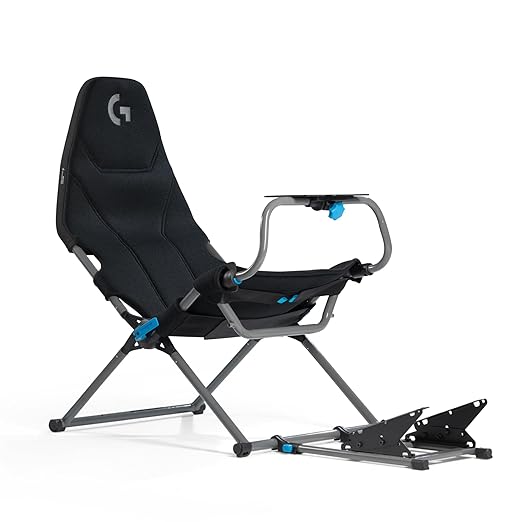
Playseat Challenge X – Logitech G Edition Sim Racing Cockpit

September 27, 2023 by Jeff Kendrick Leave a Comment

Playseat Challenge X - Logitech G Edition Sim Racing Cockpit

The Playseat Challenge X – Logitech G Edition offers a range of features designed to enhance the sim racing experience. It boasts six fully adjustable racing positions, courtesy of the X-Adapt system, allowing users to find the ideal balance between comfort and stability. This adaptability extends to the positioning of pedals and the racing wheel, replicating the feel of being inside a real car.

If you seek a broad array of iRacing setups at prices that actually make sense, you will find
them in our Discord. We keep the selection wide and the costs low, just as they ought to be
.

Comfort during extended racing sessions is paramount, and the Playseat addresses this with its ActiFit material. This breathable fabric conforms to the body, providing superior support and comfort. The adjustable rigidity ensures a personalized experience, and the material’s heat dissipation properties help keep users cool, enhancing focus and enjoyment.

One standout feature is its lightweight design, weighing just 13 kg (28 lbs). This portability makes it easy to fold and store, eliminating the need for a dedicated space and making it an ideal choice for those seeking a full racing experience without the spatial commitment.

Ease of access is another notable aspect, with a user-friendly open cockpit entry system, enabling drivers to quickly and effortlessly jump into the driver’s seat, securing them for an exhilarating racing experience.

For those who enjoy shifting gears, the Playseat Challenge X – Logitech G Edition comes equipped with a shifter mount. This feature allows users to upgrade their racing setup with the Logitech G Driving Force Shifter, offering a more immersive experience.

Additionally, the Playseat is designed for straightforward assembly, with a patented design that eliminates the need for tools. This streamlines the setup process, ensuring more time is spent on the track and less in the pits, making it an appealing option for both novices and seasoned sim racers alike.

Filed Under: Gaming Gear Tagged With: folding gaming chair, logitech playseat folding cockpit

Reader Interactions

Leave a Reply Cancel reply

Your email address will not be published. Required fields are marked *

Primary Sidebar

iRacing Setups are Now
Available Here (OSR Discord)

FREE iRacing Setups are
Available Here (Limited)

Best Bang-For-Buck Entry-Level DD

Moza R5 BundleThe Moza R5 Bundle delivers the best value in entry-level direct drive — 5.5Nm of smooth power at a price that actually makes sense.

OSR Social Links

  • OSR Rumble Racing Videos
  • OSR Youtube Racing Videos
  • OSR Discord
  • OSR Facebook
  • OSR 𝕏

Search

OSR Rumble Racing Videos | OSR Discord | OSR Facebook
© 2026 · Old School Racing Motorsports · Privacy