If you share my passion for sim racing but face constraints in terms of time, budget, and space for a dedicated racing setup, Logitech has come up with an ingenious solution. Their new Playseat Challenge X racing chair, which conveniently folds away, offers the full sim racing experience without the typical limitations.
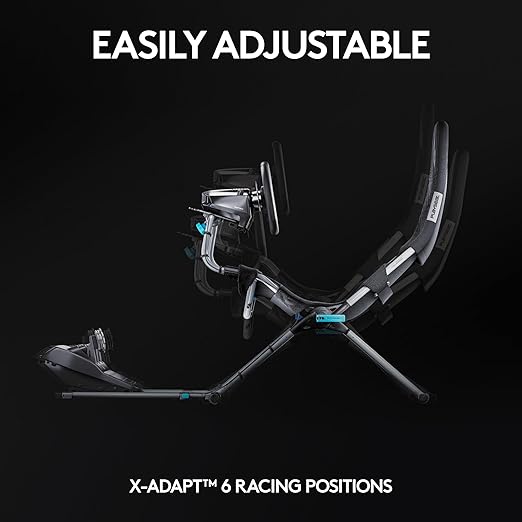 Logitech’s gaming arm, Logitech G, has joined forces with Playseat, a gaming chair specialist, to create an elegant foldable racing simulation cockpit chair that conveniently fits into your closet when not in use. Priced at $299, this budget-friendly option for indulging in home-based racing remains somewhat high, but it offers a more affordable alternative compared to their previous collaboration while maintaining the added convenience of foldability.
Logitech’s latest seating solution prioritizes flexibility and, to some extent, cost-effectiveness. The seat is notably lightweight, weighing in at just 11.6 kg, and can be effortlessly folded in half when not in use. This ingenious feature ensures that you can reclaim valuable room or office space that would otherwise be permanently occupied by a conventional racing cockpit. Additionally, the seat can be folded with the wheel and pedals still attached, further enhancing the Playseat’s overall flexibility.
The Playseat Challenge X – Logitech G Edition bears a striking resemblance to the non-collaborative Playseat Challenge Black Actifit, which comes at a slightly more budget-friendly price point, approximately $70 cheaper. However, the Logitech version includes some notable extras, such as a gear shift mount, which is an optional addition to the standard non-collaborative version. It also features a tilting pedal mount that does not seem to be present in the regular Challenge model. Moreover, the Logitech variant incorporates an additional handle for convenient position adjustment, along with the distinctive Logitech G logo and an eye-catching blue-on-black color scheme.

Logitech’s marketing highlights its compatibility with the Logitech G racing wheel and Logitech G Driving Force Shifter, while also assuring support for a wide range of other wheels, pedals, and shifters available in the market.
The seat’s construction utilizes breathable ActFit material, meticulously designed for comfort and optimal cooling during extended racing sessions. It offers six distinct height adjustment settings, allowing you to tailor the seat to your preferred height and recline angle. The chair’s structural integrity is maintained by robust X-adapt hinges crafted from flow-forged aluminum, combined with a durable carbon steel frame and reinforced plastic connectors. Consequently, assembling the chair is a straightforward process, requiring no specialized tools beyond the standard Allen screws and Allen key commonly included in furniture kits.
Beneath the seat, you’ll find adjustable poles designed to securely hold the pedals in place, offering flexibility to accommodate various leg lengths. Furthermore, the seat offers six different positions that enable you to attain a car-like seating experience, even though it resembles a lawn chair at its core.
The Challenge X Playseat naturally provides full support for Logitech’s current lineup of racing wheels, pedals, and shifters. However, from our observations, there appear to be no restrictions preventing you from installing non-Logitech racing peripherals on the chair. Notably, Logitech’s website does not include any compatibility specifications related to racing wheels for the Challenge X Playseat.

Logitech G923 Racing Wheel & Pedals
One of the most popular entry-to-mid level sim racing wheels available today. The G923 delivers strong TRUEFORCE feedback up to 1000 Hz that lets you feel the road with refreshing clarity, a responsive brake pedal with progressive spring, and a solid set of pedals built for consistent control. It includes a programmable dual-clutch launch system for cleaner starts, a genuine leather-wrapped wheel, and straightforward compatibility with PC, Xbox Series X|S, and Xbox One.
Buy on AmazonAffiliate link • Ships fast from Amazon
If you’re contemplating a dedicated racing chair, chances are you’re quite committed to racing simulations. The Challenge X could prove to be an attractive choice for those who were deterred by the size or cost of alternative cockpits. Remarkably, the entire setup weighs a mere 26 pounds and conveniently folds up for storage when not in use.
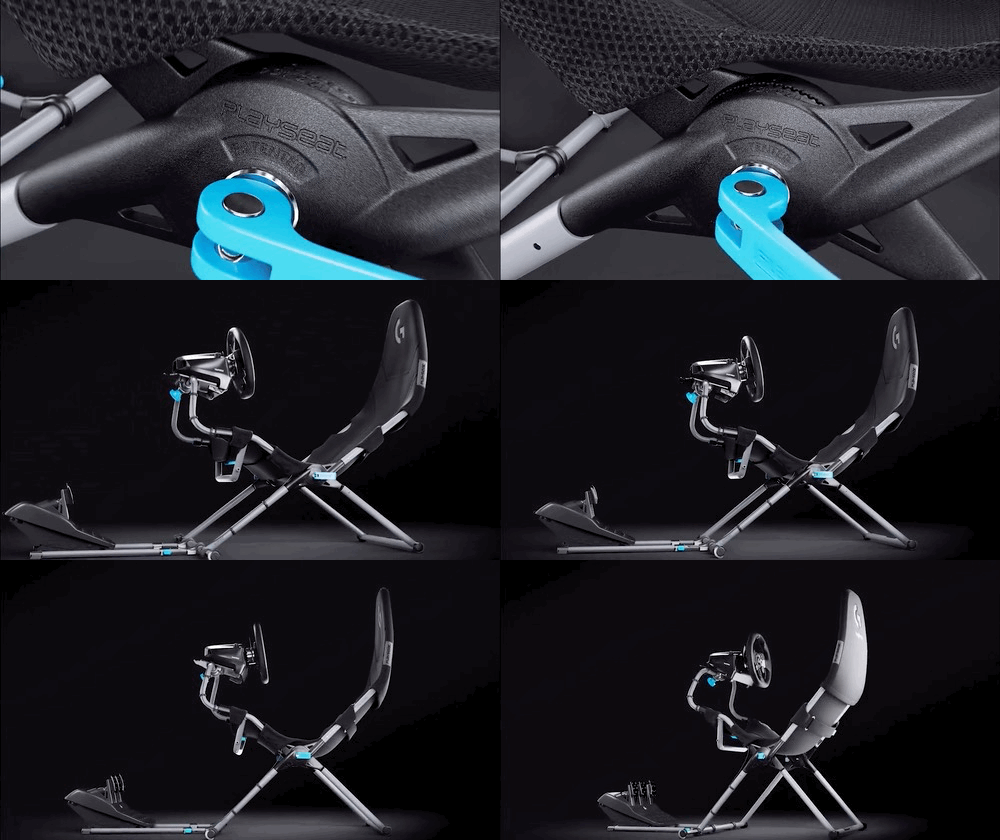 Arguably, the most notable drawback of the Challenge X Playseat is its price tag, set at $299.00. In the realm of sim racing, this figure may not appear exorbitant, especially when compared to the typical cost of $600 or more for a complete chassis and seat, such as Logitech’s Playseat Trophy Logitech G Edition. However, it still represents a significant investment, particularly for more casual racers who do not intend to replace their primary office or gaming chair with Logitech’s racing seat. Moreover, it stands $70 higher than Playseat’s own Challenge Black ActiFit variant, which bears a striking resemblance to the Challenge X created in collaboration with Logitech.
Nonetheless, Logitech’s latest racing product represents its most affordable racing chair to date, and it seems to provide a degree of portability and adaptability that few other racing configurations can match.
If unexpected visits from your aunt and uncle occur, the Playseat Challenge X – Logitech G Edition can even serve as a (rather pricey) guest chair that you can conveniently bring out as needed. You can inform your uncle that the chair is designed to conform to his body, offers “adjustable rigidity,” and features breathable mesh to keep him thermally comfortable (which he might appreciate). However, be mindful not to recline it too far back, or he might have difficulty reaching for his chai.
Once your guests depart, you can easily reattach the racing wheel and pedals, allowing you to settle in, cue up another track, and hit the racetrack once more. Logitech is currently offering the Playseat Challenge X – Logitech G Edition for purchase on Amazon.
Leave a Reply