• Skip to main content
  • Skip to secondary menu
  • Skip to primary sidebar

Old School Racing

iRacing Setups and Resources • Dirt & Asphalt Oval Racing News

  • Get iRacing Setups
  • iRacing Driving Tips
    • iRacing Rookie Tips
      • Tips for Surviving the iRacing Rookie Series
      • iRacing Dirt Career Paths for Rookies (and Beyond)
      • iRacing Rookie Guide Part 1
      • iRacing Rookie Guide Part 2
      • iRacing Rookie Tip: Stop The Car
      • iRacing Rookie Tips: Getting Started and Moving Up
      • iRacing Savvy – Develop Your Racecraft
      • Surviving The iRacing Rookie Series
    • Virgil Graham Slide Job Video
  • iRacing Quick Tips
  • iRacing Setup Help
    • How to Adjust iRacing Asphalt Legends Car Springs and Cross Weight
    • How to Adjust iRacing Sprint Car Cross Weight AKA Wedge
    • How to Make an iRacing Sprint Car Qualifying Setup
    • iRacing Advanced Legends Car Setup Matrix
    • iRacing Asphalt Late Model Stock Car Setup Matrix
    • iRacing Big Block Modified Setup Guide
    • iRacing Big Block Modified Setup Matrix
    • iRacing Dirt Late Model Setup Matrix
    • iRacing Dirt Sprint Car Setup Matrix
    • iRacing Dirt UMP Modified Setup Matrix
    • iRacing Dirt Car Specifications
    • iRacing Dirt Winged Sprint Car Setup Tutorial
    • iRacing Setup Guides
    • iRacing Setup Shop: Tire Stagger
    • iRacing Setup Stagger Chart
    • iRacing Setup Tips for Asphalt Oval Racing
    • NASCAR iRacing Class A Next Gen Cup Car Setup Matrix
    • Quick & Easy Guide: Making an iRacing Dirt 358 Modified Setup
  • iRacing Ton-o-Help
    • Hidden Feature in the iRacing Simulation: DriverRotateHead
    • Hidden Feature in the iRacing Simulation: DriverHeadHorizon
    • How to Automatically Set and Save the Correct Force Feedback For Each Car in iRacing
    • How to Change the Head Rotation Look Angle in iRacing
    • How to Disable Automatic Fast Repair, Tire Changes, and Fuel Fill in iRacing
    • How To Download and Open iRacing Setups
    • How to Improve Your Safety Rating Without the Risk of Racing Against Other Drivers
    • How to Install, Configure, and Use Discord
    • How to Properly Use Custom Car Numbers in iRacing
    • How To Run an iRacing Time Trial
    • iRacing Radio Information
    • Logitech G27 Calibration and Settings for Dirt Rally
    • Logitech G27 Calibration and Settings for iRacing
    • Logitech G29 and G920 Calibration and Settings for iRacing
    • Understanding the Dirt Late Model
  • FREE iRacing Setups

iRacing Dirt Update

August 30, 2016 by Jeff Kendrick Leave a Comment

If you seek a broad array of iRacing setups at prices that actually make sense, you will find
them in our Discord. We keep the selection wide and the costs low, just as they ought to be
.

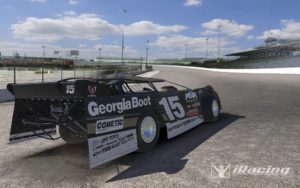
iRacing Dirt Late ModelThis is just a quick post regarding some iRacing dirt news I saw today in the official iRacing forum. The word from iRacing has been that there will be three versions of the Dirt Late Model, each with different horsepower. Some members were wondering if they would have to buy all three versions as separate carss, or if the three versions would be a single car purchase.

The good news is, you will get all three of the iRacing Dirt Late Model versions with a single car purchase. Tony Gardner answered this question and had some other good news.

We are likely to have three different versions of the dirt late model. However all three will be for the price of one car, really just mainly three different engines/HP. Additionally we will probably only pick one for the official series at least to start. I was just actually watching Steve and Dave K drive the dirt late Model at Eldora on a local build. Still a ways to go but looking good!

We also will have other dirt cars as discussed. For example a dirt street stock and messing with a dirt legends car as another possibility. Those one or two cars would be free and provided with the base package.

So there you have it. One purchase for the three Dirt Late Model cars, plus a free Street Stock and Legends Car, just like on the asphalt side.

Logitech G29 Driving Force Racing Wheel and Floor Pedals, Real Force Feedback, Stainless Steel Paddle Shifters, Leather Steering Wheel Cover for PS5, PS4, PC, Mac Serious sim racers know the difference between a toy and a tool. The Logitech G29 Driving Force Racing Wheel and Pedals delivers the real thing. With precise force feedback, stainless-steel paddle shifters, and responsive floor pedals, every corner and braking zone feels authentic. Built for PlayStation and PC, the G29 turns your sim rig into a true driver’s seat. If you want tighter laps and sharper control, this is the wheel that gets you there.
List Price: $399.99SALE: $303.97

These good news tidbits keep the fire of excitement for iRacing dirt stoked. I’m really looking forward to it as I know many of you are. The latest rumor is 2016 Season 4 (September) or possibly 2017 Season 1 (December). This stems from a tweet by Eldora Speedway.

Coming to @iRacing this fall #DirtConfirmed

You can see the Tweet and comments at https://twitter.com/eldoraspeedway/status/764148080090439680.

Filed Under: iRacing Dirt Tagged With: dirt late model, dirt legends car, dirt street stock, dirt track racing, iracing dirt, iracing dirt confirmed

Reader Interactions

Leave a Reply Cancel reply

Your email address will not be published. Required fields are marked *

Primary Sidebar

iRacing Setups are Now
Available Here (OSR Discord)

FREE iRacing Setups are
Available Here (Limited)

Best Bang-For-Buck Entry-Level DD

Moza R5 BundleThe Moza R5 Bundle delivers the best value in entry-level direct drive — 5.5Nm of smooth power at a price that actually makes sense.

OSR Social Links

  • OSR Rumble Racing Videos
  • OSR Youtube Racing Videos
  • OSR Discord
  • OSR Facebook
  • OSR 𝕏

Search

OSR Rumble Racing Videos | OSR Discord | OSR Facebook
© 2026 · Old School Racing Motorsports · Privacy