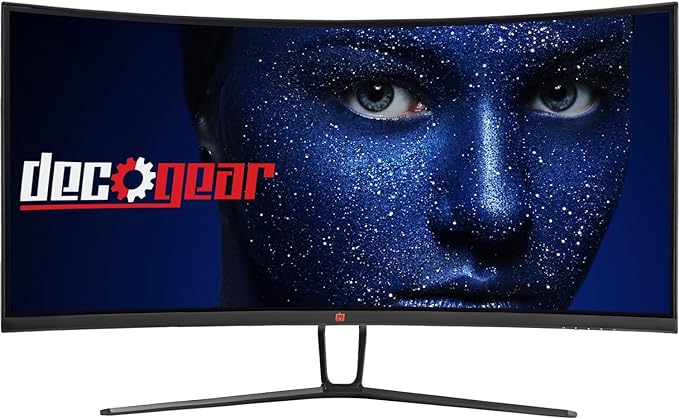
If you’re in the market for a new ultrawide monitor and are open to exploring options beyond the well-known brands, we have an enticing deal for you. The Deco Gear 35-inch curved gaming monitor is currently available on Amazon at a significant 27% discount. Despite its affordability, this monitor offers a compelling set of features that make it a worthy contender in the world of gaming and productivity displays. In this comprehensive review, we’ll delve into the various aspects of this monitor to help you assess its value for money.
- Large Display Size
The Deco Gear 35-inch curved gaming monitor boasts a generous screen size that is perfect for multitasking and immersive gaming experiences. Its 35-inch display provides ample screen real estate for juggling multiple tasks simultaneously or getting lost in the world of gaming. Whether you’re a professional seeking enhanced productivity or a gamer looking for a captivating visual experience, this monitor’s size is sure to impress.

Logitech G920 Driving Force Racing Wheel & Pedals
This serves as a no-nonsense entry into realistic driving. Dual-motor force feedback delivers honest steering weight and road detail, while the sturdy floor pedals offer progressive braking and smooth throttle. Stainless steel paddle shifters, a leather-wrapped rim, and a full 900-degree rotation create a setup that earns its spot on your rig without needless extras. It works cleanly with Xbox Series X|S, Xbox One, and PC.
Buy on AmazonAffiliate link • Ships fast from Amazon
- High Ultrawide Screen Resolution
One of the standout features of this monitor is its ultrawide 3440 x 1440 resolution display. This VA ELED panel delivers a true WQHD (Wide Quad High Definition) experience, offering precise clarity and breathtaking detail. Whether you’re gaming, watching videos, or editing photos, this monitor ensures that every pixel shines. The high resolution results in sharp and vivid visuals, making it a great choice for both work and play.
- Wide Curvature for Immersion
The Deco Gear monitor features an 1800R curvature, which enhances immersion by enveloping the viewer. This curvature reduces eye strain and provides a more natural field of view, making it ideal for extended productivity sessions or immersive gaming marathons. The curve of the screen ensures that content wraps around your peripheral vision, creating a captivating and engaging viewing experience.
- Prime Connectivity and Performance
Connectivity and performance are critical aspects of any gaming monitor, and the Deco Gear monitor doesn’t disappoint. It offers HDMI 2.0 and DP 1.4 connections, allowing you to achieve refresh rates of up to 120 Hz. This means you can enjoy smooth and seamless gameplay without stuttering or tearing. Gamers will appreciate the ultra-fast 1 millisecond MPRT (Moving Picture Response Time) response time, which minimizes input lag and provides a real-time gaming feel. This combination of features ensures that you have a competitive edge in fast-paced gaming scenarios.

Thrustmaster T300RS GT Steering Wheel & Pedal Set
The T300 is a proven mid-range wheel with smooth belt-driven force feedback and a responsive brushless motor for clear track feel. An 11-inch leather wheel, solid three-pedal GT set, and PS5, PS4, and PC compatibility give racers the precision to brake later, hold tighter lines, and improve lap after lap.
Buy on AmazonAffiliate link • Ships fast from Amazon
- Fantastic Color Gamut
For those who prioritize color accuracy and vibrant visuals, the Deco Gear monitor excels in this department. It can display up to 16.7 million colors, resulting in stunning and lifelike images. With a 99% sRGB color accuracy rating, it reproduces colors with precision, making it suitable for tasks that require color consistency, such as graphic design and photo editing. Additionally, it boasts a 90% DCI-P3 color space coverage and support for Adobe RGB, further expanding its versatility. Whether you’re working on professional tasks or indulging in games and movies, this monitor delivers exceptional visual quality.
Value for Money Assessment
At a price point of $299.99, the Deco Gear 35-inch curved gaming monitor offers several features that represent excellent value for money:
- Color Accuracy: The monitor’s 90% DCI-P3 rating and 99% sRGB color accuracy are impressive, making it a solid choice for creative professionals, including video editors, who are conscious of their budget.
- Contrast Ratio: With a 3000:1 contrast ratio, this monitor provides deep blacks and vibrant whites, enhancing the overall visual experience for both work and play.
- Refresh Rate: The 120 Hz refresh rate is commendable, especially considering the price. While it may not compete with higher refresh rates like 240 Hz, it is well-suited for gamers seeking an immersive experience rather than ultra-competitive gameplay. The curved display enhances immersion, making it ideal for gaming genres that benefit from increased immersion.
- Aesthetics: The monitor’s sleek design with thin bezels and a minimalist stand sets it apart in terms of aesthetics, a feature not commonly found in monitors at this price range.
Conclusion
In conclusion, the Deco Gear 35-inch curved gaming monitor offers a compelling blend of features and affordability. Its large display size, high ultrawide screen resolution, wide curvature, prime connectivity and performance, and fantastic color gamut make it a versatile choice for both productivity and gaming enthusiasts. With a price tag of $299.99, it represents excellent value for money, particularly for creative professionals and gamers seeking an immersive experience. Its sleek design further adds to its appeal. If you’re in the market for an ultrawide monitor that doesn’t break the bank, the Deco Gear monitor is certainly worth considering.
Leave a Reply