iRacing released more detailed information on their heat racing format that will be released very soon. I’m going to try to hit the major points in this article, and summarize the heat race process.
Heat races will take place in several different iRacing official series including short asphalt oval series, dirt oval series, and global rallycross. It’s unclear which official series will actually include heat races. Why not all dirt, GRC, and short track series? I don’t know. It seems a little cheap initially, but maybe iRacing wants to test it in a few series before full implementation. For now, it appears that heat races will be used in the Asphalt Super Late Model, one Winged Sprint Car Series, one Dirt Late Model Series, and the Class D GRC Series. It’s good that heat racing soon will be here, but the limitations are disappointing. Heat racing for hosted and league racing is said to be in the works, but “may get pushed back from the build.”

Thrustmaster T300RS GT Steering Wheel & Pedal Set
The T300 is a proven mid-range wheel with smooth belt-driven force feedback and a responsive brushless motor for clear track feel. An 11-inch leather wheel, solid three-pedal GT set, and PS5, PS4, and PC compatibility give racers the precision to brake later, hold tighter lines, and improve lap after lap.
Buy on AmazonAffiliate link • Ships fast from Amazon
The Heat Race Format
Now let’s get to the actual race events. The flow of a racing event that includes heat races will typically follow the structure below. All of the stages listed will take place within a single iRacing session. You won’t need to disconnect, reconnect, or jump from server to server as you would in iRacing tournament sessions.
- Practice
There will be a short open practice session that is designed to allow time for drivers to connect to the session in plenty of time for qualifying. Since this format will involve (theoretically, at least) many cars, the cars are split into “run-groups.” This allows everyone to practice yet keeps the number of car on the track at a reasonable number. - Qualifying
Session hosts will be able to select either closed qualifying or open qualifying. Closed qualifying is the same as lone qualifying, i.e., everyone qualifies alone at the same time. With open qualifying, everyone is on the track at the same time, but the cars are split into run-groups, similar to the split used in the practice stage.Qualifying is optional. If no qualifying stage is included, the heat race grids are formed randomly, as they would be in a pill draw. - Heat Races
Session hosts can specify how many cars transfer from the heat races to the feature race. Anyone who doesn’t transfer to the feature race is added to the unqualified drivers list. It is possible to set it up so that no drivers transfer directly from the heat races to the feature. The drivers from the heat races would still need to earn their way into the final by participating in one or more semi-final races.The grid for the feature is set from the heat races. The unqualified drivers will then advance to an optional consolation race or races. - Consolation Races
Consolation races can be stacked, meaning that the top drivers from each consolation race advance to the next consolation race. Only the top drivers from the final consolation race make it to the end of the grid for the feature race. If the consolation races are not stacked, the grids are filled directly from the unqualified drivers list. The top finishers from each consolation race advance to the end of the grid for the feature race. - Warmup
Only the drivers who are on the grid for the feature can participate in the pre-race warmup stage. Session hosts can leave out the warmup stage. - Feature Race
This is the final stage of the racing event. Only the drivers who have qualified for the feature will be allowed to participate.
Championship Points
iRacing will award championship points to all participants as follows:

Next Level Racing Wheel Stand 2.0
Master your laps without dominating the room. The Next Level Racing Wheel Stand 2.0 stands rock-solid for direct-drive wheels, yet folds away in seconds when real life calls. Full adjustability for wheel, pedals, and shifter lets a man settle into his proper position the honest way. A clever chair cradle keeps your seat planted under hard braking, while predrilled mounts welcome Thrustmaster, Fanatec, Logitech, and the rest. Upgrade later to a full cockpit with the GTSeat add-on. Serious performance, sensible footprint—no compromises required.
Buy on AmazonAffiliate link • Ships fast from Amazon
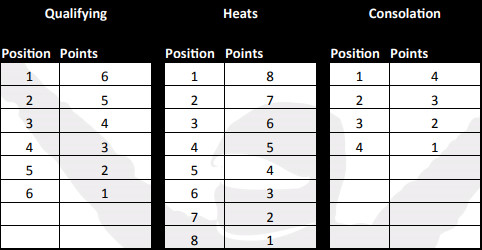
Points are awarded for the feature race and will follow the iRacing points system, in which the number of points awarded depends on the field size and the Strength of Field, or average iRating of the field. Only the driver who made it to the feature are considered when making these calculations.
General Information
- You will have a fresh car at the beginning of every session.
- The track state carries over from one session to the next.
- Once hosted heat racing is fully implemented, the host can set up heat races for any type of track.
All in all, it sounds like a great heat race implementation and iRacing has pretty much covered every aspect in detail.
Leave a Reply