• Skip to main content
  • Skip to secondary menu
  • Skip to primary sidebar

Old School Racing

iRacing Setups and Resources • Dirt & Asphalt Oval Racing News

  • Get iRacing Setups
  • iRacing Driving Tips
    • iRacing Rookie Tips
      • Tips for Surviving the iRacing Rookie Series
      • iRacing Dirt Career Paths for Rookies (and Beyond)
      • iRacing Rookie Guide Part 1
      • iRacing Rookie Guide Part 2
      • iRacing Rookie Tip: Stop The Car
      • iRacing Rookie Tips: Getting Started and Moving Up
      • iRacing Savvy – Develop Your Racecraft
      • Surviving The iRacing Rookie Series
    • Virgil Graham Slide Job Video
  • iRacing Quick Tips
  • iRacing Setup Help
    • How to Adjust iRacing Asphalt Legends Car Springs and Cross Weight
    • How to Adjust iRacing Sprint Car Cross Weight AKA Wedge
    • How to Make an iRacing Sprint Car Qualifying Setup
    • iRacing Advanced Legends Car Setup Matrix
    • iRacing Asphalt Late Model Stock Car Setup Matrix
    • iRacing Big Block Modified Setup Guide
    • iRacing Big Block Modified Setup Matrix
    • iRacing Dirt Late Model Setup Matrix
    • iRacing Dirt Sprint Car Setup Matrix
    • iRacing Dirt UMP Modified Setup Matrix
    • iRacing Dirt Car Specifications
    • iRacing Dirt Winged Sprint Car Setup Tutorial
    • iRacing Setup Guides
    • iRacing Setup Shop: Tire Stagger
    • iRacing Setup Stagger Chart
    • iRacing Setup Tips for Asphalt Oval Racing
    • NASCAR iRacing Class A Next Gen Cup Car Setup Matrix
    • Quick & Easy Guide: Making an iRacing Dirt 358 Modified Setup
  • iRacing Ton-o-Help
    • Hidden Feature in the iRacing Simulation: DriverRotateHead
    • Hidden Feature in the iRacing Simulation: DriverHeadHorizon
    • How to Automatically Set and Save the Correct Force Feedback For Each Car in iRacing
    • How to Change the Head Rotation Look Angle in iRacing
    • How to Disable Automatic Fast Repair, Tire Changes, and Fuel Fill in iRacing
    • How To Download and Open iRacing Setups
    • How to Improve Your Safety Rating Without the Risk of Racing Against Other Drivers
    • How to Install, Configure, and Use Discord
    • How to Properly Use Custom Car Numbers in iRacing
    • How To Run an iRacing Time Trial
    • iRacing Radio Information
    • Logitech G27 Calibration and Settings for Dirt Rally
    • Logitech G27 Calibration and Settings for iRacing
    • Logitech G29 and G920 Calibration and Settings for iRacing
    • Understanding the Dirt Late Model

Dive into Deeper Gameplay: HP Omen 27-Inch Curved Monitor Now at $350

August 25, 2023 by Jeff Kendrick Leave a Comment

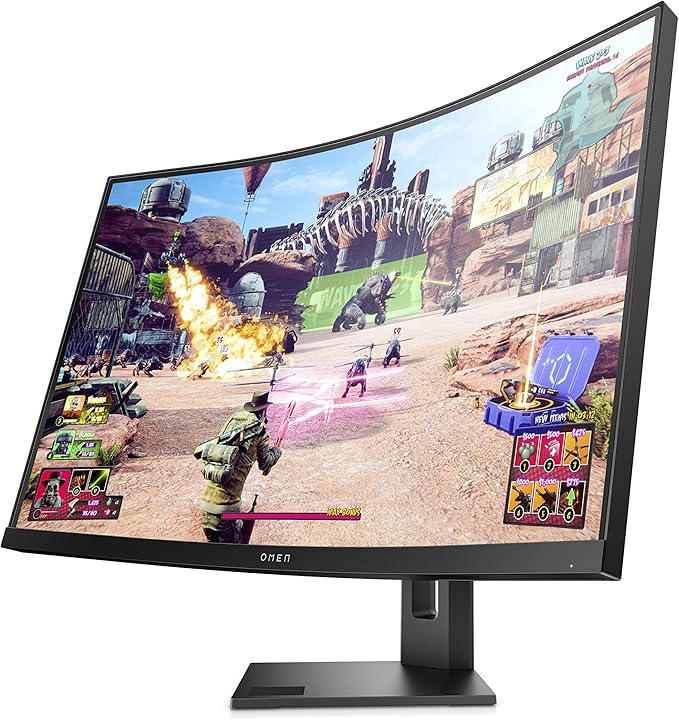
HP OMEN 27
HP OMEN 27″ QHD Curved Monitor

Score the HP OMEN 27-inch QHD Curved Monitor for Only $349.99 on Amazon, including shipping. This fantastic deal marks a 22% reduction from the regular price of $450, and it’s the second-lowest cost we’ve spotted for this item. Immerse yourself in gaming realism with its 1,000R curved display, delivering an extraordinary and lifelike gaming encounter. With a rapid 240Hz refresh rate and lightning-fast 1ms response time, you can effortlessly tackle the latest and most demanding games at 1440p, achieving up to 240fps for unparalleled smoothness and speed, all while eliminating motion blur. Plus, this display adheres to TÜV low blue light criteria and Eyesafe standards, providing protection against harmful blue light without compromising color accuracy.

If you want a bigger monitor and have a little more in your pocket, explore the Samsung 32-inch M70C UHD Smart Monitor – a versatile solution for all your entertainment needs. With AirPlay 2 compatibility, this intelligent monitor transforms into an all-inclusive entertainment hub. Immerse yourself in stunning 4K HDR video streaming from various apps or indulge in the latest gaming sensations, all without the requirement of a PC or gaming console.

Highlighted Features of the HP OMEN 27-inch QHD Curved Monitor:

  • 1000R Curved Display: Immerse yourself in an unparalleled gaming adventure with the impressively curved screen that draws the edges of the display closer, providing an exceptionally realistic and captivating gaming experience.
  • 240Hz Refresh Rate: Unleash the potential of the latest games at 1440p, achieving up to 240fps for a gaming encounter characterized by speed and seamless performance.
  • Eyesafe Certified Display: Certified by Eyesafe, this display meets the stringent TÜV low blue light requirements and adheres to Eyesafe standards. It effectively safeguards your eyes against the harmful effects of blue light without compromising the integrity of colors. Integrated Eyesafe displays help alleviate eyestrain and enhance comfort during extended gaming sessions.

Filed Under: Racing News Tagged With: hp omen gaming monitor, monitor sale amazon

Reader Interactions

Leave a Reply Cancel reply

Your email address will not be published. Required fields are marked *

Primary Sidebar

iRacing Setups are Now
Available Here (OSR Discord)


Premier Racing Setups Logo
Try Premier Racing Setups

OSR Social Links

  • OSR Rumble Racing Videos
  • OSR Discord
  • OSR Facebook
  • OSR 𝕏

Search

OSR Rumble Racing Videos | OSR Discord | OSR Facebook
© 2026 · Old School Racing Motorsports · Privacy