• Skip to main content
  • Skip to secondary menu
  • Skip to primary sidebar

Old School Racing

iRacing Setups and Resources • Dirt & Asphalt Oval Racing News

  • Get iRacing Setups
  • iRacing Driving Tips
    • iRacing Rookie Tips
      • Tips for Surviving the iRacing Rookie Series
      • iRacing Dirt Career Paths for Rookies (and Beyond)
      • iRacing Rookie Guide Part 1
      • iRacing Rookie Guide Part 2
      • iRacing Rookie Tip: Stop The Car
      • iRacing Rookie Tips: Getting Started and Moving Up
      • iRacing Savvy – Develop Your Racecraft
      • Surviving The iRacing Rookie Series
    • Virgil Graham Slide Job Video
  • iRacing Quick Tips
  • iRacing Setup Help
    • How to Adjust iRacing Asphalt Legends Car Springs and Cross Weight
    • How to Adjust iRacing Sprint Car Cross Weight AKA Wedge
    • How to Make an iRacing Sprint Car Qualifying Setup
    • iRacing Advanced Legends Car Setup Matrix
    • iRacing Asphalt Late Model Stock Car Setup Matrix
    • iRacing Big Block Modified Setup Guide
    • iRacing Big Block Modified Setup Matrix
    • iRacing Dirt Late Model Setup Matrix
    • iRacing Dirt Sprint Car Setup Matrix
    • iRacing Dirt UMP Modified Setup Matrix
    • iRacing Dirt Car Specifications
    • iRacing Dirt Winged Sprint Car Setup Tutorial
    • iRacing Setup Guides
    • iRacing Setup Shop: Tire Stagger
    • iRacing Setup Stagger Chart
    • iRacing Setup Tips for Asphalt Oval Racing
    • NASCAR iRacing Class A Next Gen Cup Car Setup Matrix
    • Quick & Easy Guide: Making an iRacing Dirt 358 Modified Setup
  • iRacing Ton-o-Help
    • Hidden Feature in the iRacing Simulation: DriverRotateHead
    • Hidden Feature in the iRacing Simulation: DriverHeadHorizon
    • How to Automatically Set and Save the Correct Force Feedback For Each Car in iRacing
    • How to Change the Head Rotation Look Angle in iRacing
    • How to Disable Automatic Fast Repair, Tire Changes, and Fuel Fill in iRacing
    • How To Download and Open iRacing Setups
    • How to Improve Your Safety Rating Without the Risk of Racing Against Other Drivers
    • How to Install, Configure, and Use Discord
    • How to Properly Use Custom Car Numbers in iRacing
    • How To Run an iRacing Time Trial
    • iRacing Radio Information
    • Logitech G27 Calibration and Settings for Dirt Rally
    • Logitech G27 Calibration and Settings for iRacing
    • Logitech G29 and G920 Calibration and Settings for iRacing
    • Understanding the Dirt Late Model

From Legend to Successor: LG’s 27GP850 Monitor Drops to an Unbelievable $299.99

August 22, 2023 by Jeff Kendrick Leave a Comment

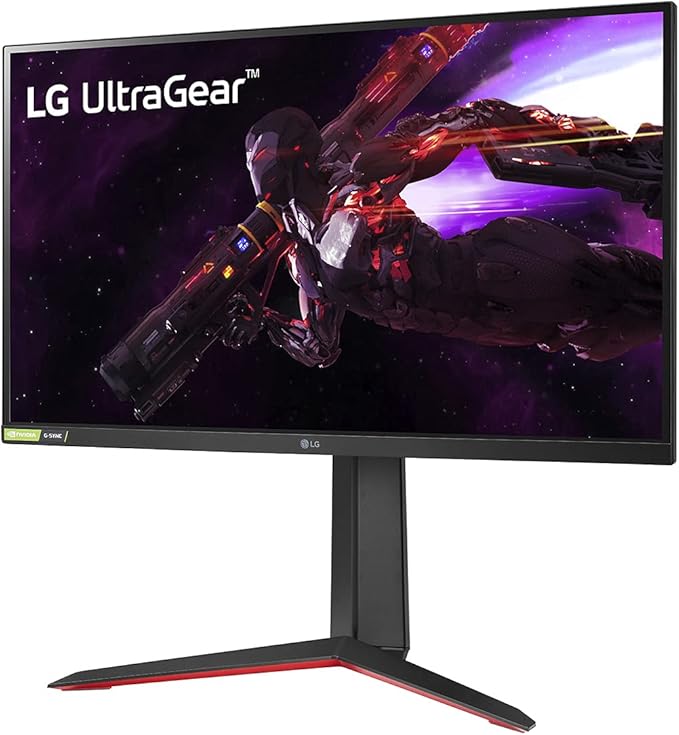
LG 27GP850-B Ultragear Gaming Monitor 27” QHD (2560 x 1440) Nano IPS Display, 1ms Response Tim, 165Hz Refresh Rate, NVIDIA G-SYNC Compatible, AMD FreeSync Premium, Tilt/Height/Pivot Adjustable Stand
LG 27GP850-B Ultragear Gaming Monitor 27” QHD (2560 x 1440) Nano IPS Display

LG’s 27GL850, renowned for its pioneering use of Korean chaebol’s Fast IPS panels, combined the rapid pixel response times akin to TN panels with the expansive viewing angles and stunning colors characteristic of IPS screens. This innovative amalgamation found immense favor, and today, we bring you news about a deal on its contemporary successor – the 27GP850.

Now priced at just $299.99 on Amazon, a significant reduction from its original tag of $429.99, the 27GP850 holds the promise of even greater appeal. The 27GL850, known for its 1440p 144Hz performance at this price point, is outshone by the 27GP850, which boasts an improved 1440p 180Hz configuration.

Snag the LG 27GP850 for $299.99 (previously $429.99)

The 27GP850 introduces several enhancements over its forerunner, the 27GL850. Its elevated brightness, securing a DisplayHDR 400 certification, translates to an enhanced contrast rating. What’s more, the monitor’s overclocking potential has been elevated to 180Hz, a step up from the original model’s 144Hz, delivering a slightly superior motion-handling experience. The inclusion of Black Frame Insertion further refines motion handling by trading some brightness for clearer distinctions between frames.

Beyond these advancements, the monitor retains the same popular attributes, including rear-facing ports for ease of use, a versatile stand with height adjustment and portrait rotation capabilities, G-Sync Compatibility, FreeSync Premium certification for PC Variable Refresh Rate (VRR), and a user-friendly OSD that seamlessly aligns with user preferences. With the LG 27GP850, the 1440p gaming experience gets elevated to a new zenith.

Additionally, the 1440p resolution, coupled with the impressive 180Hz refresh rate (which is 165Hz without overclocking), forms a compelling duo, rendering the monitor an excellent option for a spectrum spanning high-speed gaming to leisurely-paced games, as well as content creation and consumption.

The prospect of investing in this monitor is undeniably intriguing. Feel free to share your thoughts in the comment section below or seize the opportunity to make a purchase through the provided link. Here’s to your gaming and viewing enjoyment!

Filed Under: Racing News Tagged With: lg gaming monitor, monitor sale amazon

Reader Interactions

Leave a Reply Cancel reply

Your email address will not be published. Required fields are marked *

Primary Sidebar

iRacing Setups are Now
Available Here (OSR Discord)


Premier Racing Setups Logo
Try Premier Racing Setups

OSR Social Links

  • OSR Rumble Racing Videos
  • OSR Discord
  • OSR Facebook
  • OSR 𝕏

Search

OSR Rumble Racing Videos | OSR Discord | OSR Facebook
© 2026 · Old School Racing Motorsports · Privacy